Quantum Universal Copy

Quantum Universal Copy
Copy text, promo codes or code snippets with one click.
Includes Elementor widget and shortcode support.
Live Demo
Copy Text or Promo Codes
Copy Button
Copy Icon
Copy Code Snippets
Copy Button
npm install quantum-copyCopy Icon
echo "Hello World";Key Features
- Copy text instantly
- Copy promo codes
- Copy code snippets
- Elementor widget
- Shortcode support
- Icon copy mode
- Tooltip feedback
- Unlock copy protection
- Lightweight plugin
No translation plugins required. All labels can be customized directly in Elementor controls.
Common Use Cases
Quantum Universal Copy works perfectly in multiple real-world scenarios.
Promo Codes
Let visitors copy coupon or promo codes instantly.
Code Snippets
Allow users to copy code snippets instantly from tutorials or documentation.
Copy Protected Pages
Enable text selection and copying on websites that block right-click.
Interactive Copy Protection Demo
Some websites block text selection, right-click and copying. Quantum Universal Copy plugin removes these restrictions.
Toggle protection ON/OFF to simulate websites that block copying.
Quantum Universal Copy restores text selection and copying instantly.
Shortcodes Demo
Quantum Universal Copy can also be used without Elementor by using simple shortcodes.
Use this shortcode to copy text
[ quantum_copy text=”PROMO50″ ]
Note: Remove the extra spaces inside the brackets.
npm install quantum-copy
Use this shortcode to display a code block with a copy button.
[ quantum_copy_code lang=”bash”] npm install quantum-copy [/quantum_copy_code ]
Note: Remove the extra spaces inside the brackets.
Free vs Pro
Compare the features of the free and PRO versions.
| Feature | Free | PRO Recommended |
|---|---|---|
| Copy text instantly | ✔ | ✔ |
| Copy promo codes | ✔ | ✔ |
| Copy code snippets | ✔ | ✔ |
| Elementor widget | ✔ | ✔ |
| Shortcode support | ✔ | ✔ |
| Icon copy mode | ✔ | ✔ |
| Tooltip feedback | ✔ | ✔ |
| Unlock copy protection | ✔ | ✔ |
| Custom button text | ✔ | ✔ |
| Translation fields in Elementor | ✔ | ✔ |
| Support | WordPress.org forum | 1 year premium support |
| Typography controls | — | ✔ |
| Button styling | — | ✔ |
| Icon styling | — | ✔ |
| Layout customization | — | ✔ |
| Spacing & padding controls | — | ✔ |
Unlock advanced styling and customization options.
How It Works
Install Quantum Universal Copy from the WordPress plugin directory.
Drag the Quantum Universal Copy widget into your Elementor layout.
Visitors can copy text, promo codes or code snippets with one click.
How to Use Quantum Universal Copy
1. Open a page in Elementor.
2. Drag the Quantum Universal Copy widget into your layout.
3. Select the copy mode (Text or Code).
4. Enter the content you want users to copy.
5. Choose button mode or icon mode.
6. Customize the button text or copied message.
7. Publish or update the page.
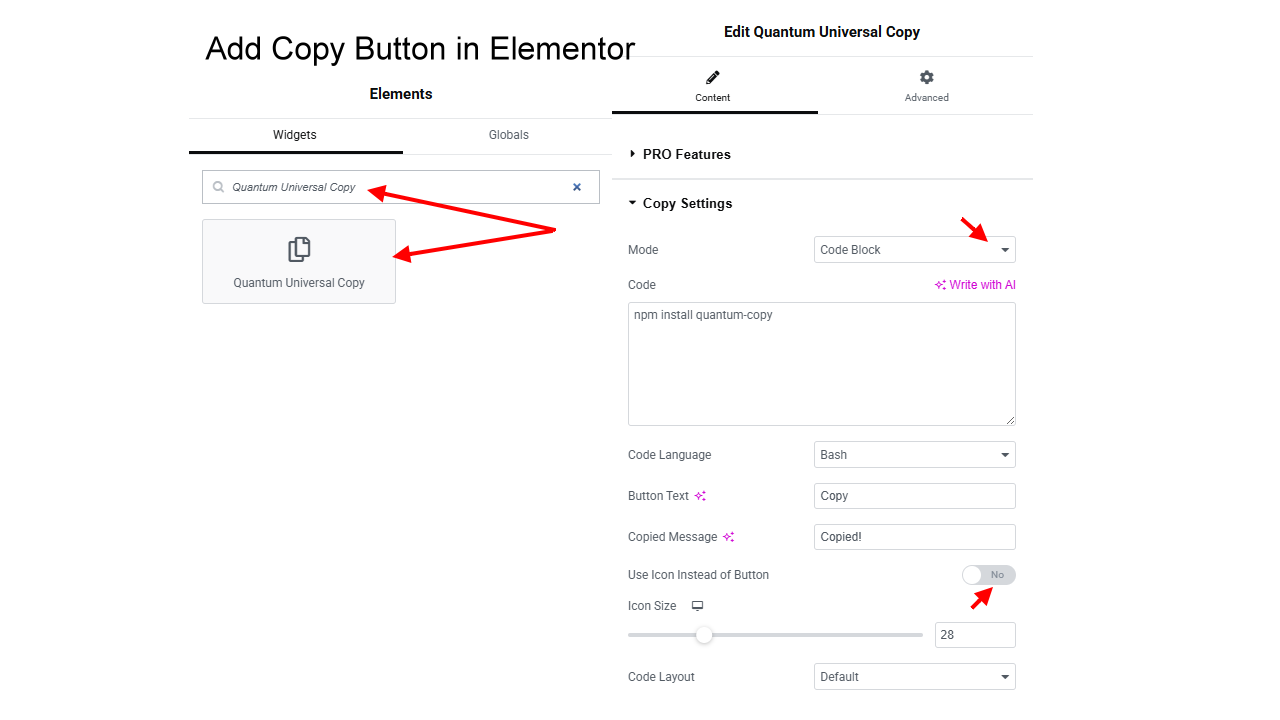
Add Copy Button in Elementor
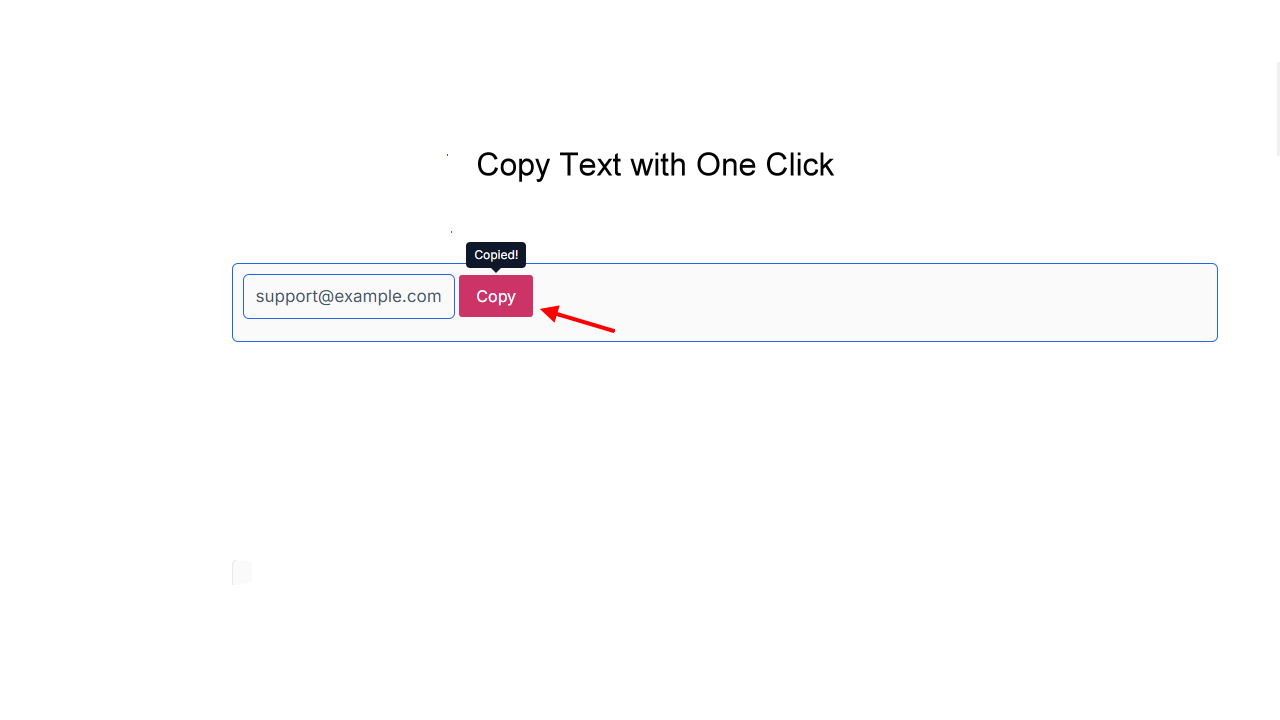
Copy Text Instantly
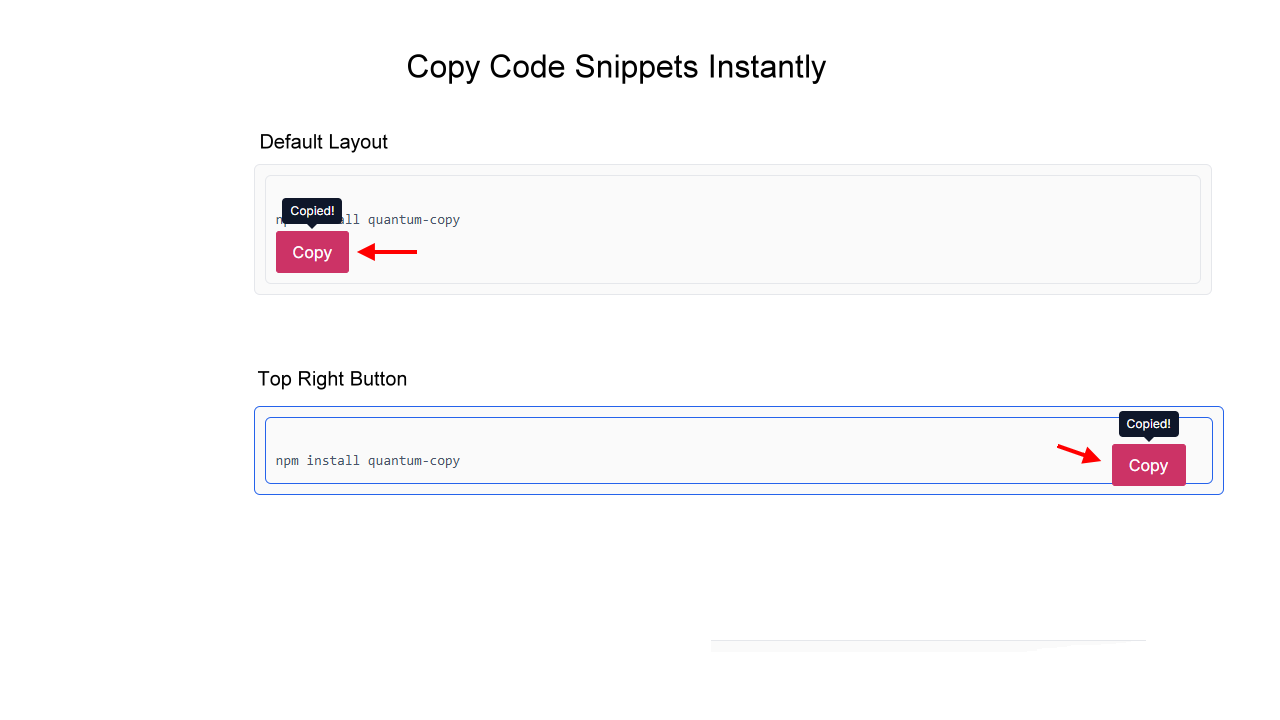
Copy Code Snippets
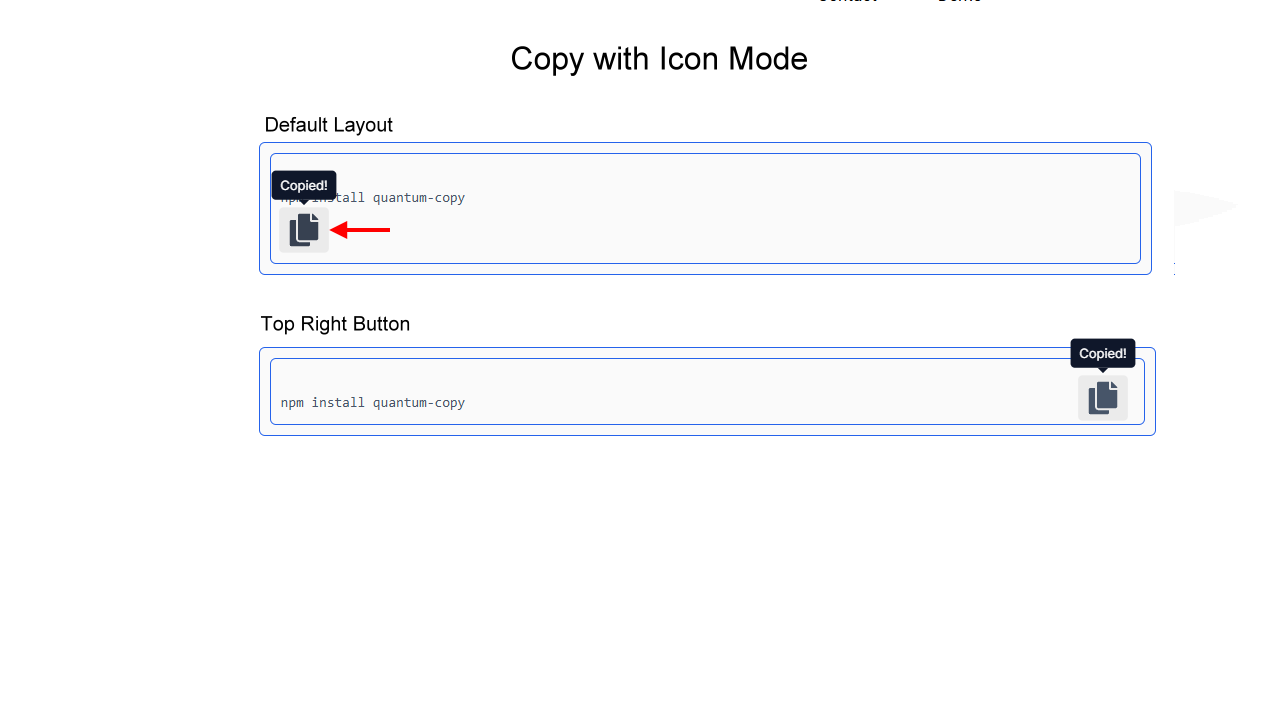
Icon Copy Mode
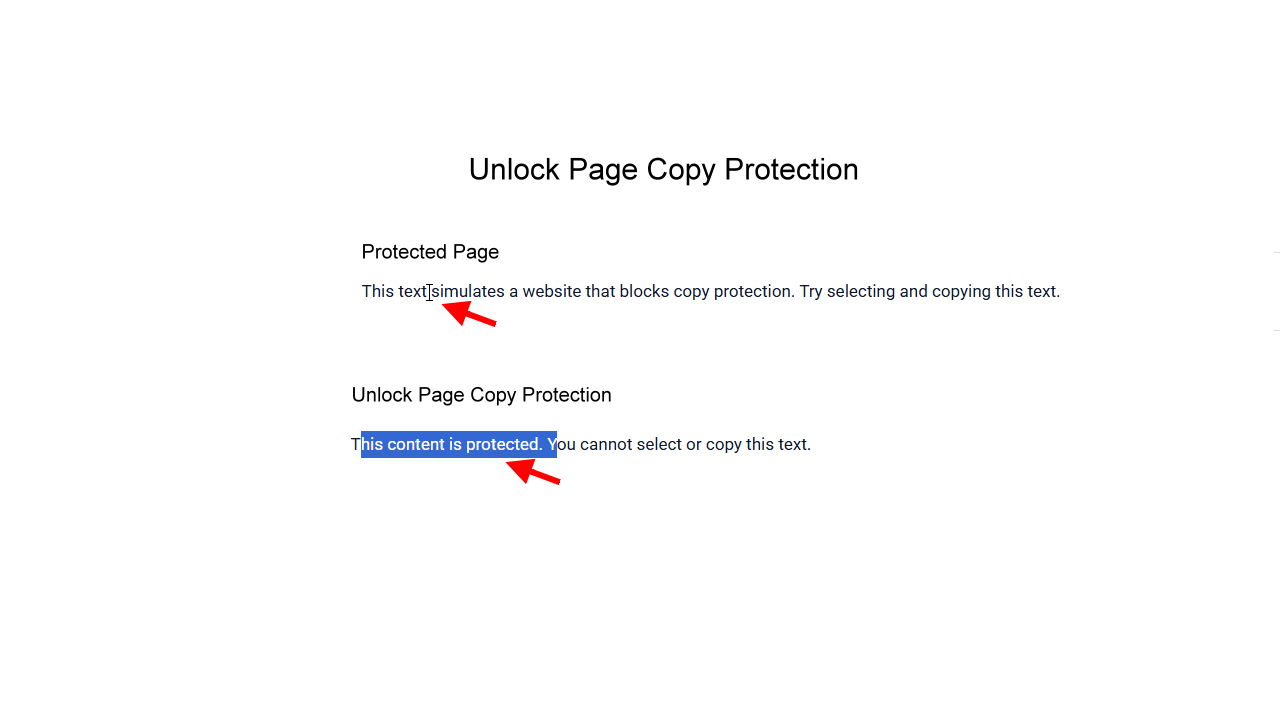
Unlock Copy Protection
Perfect For
✔ Coupon and promo code websites
✔ Developer documentation
✔ Tutorial websites
✔ SaaS landing pages
✔ Affiliate websites
✔ Technical blogs
Lightweight & Developer Friendly
Quantum Universal Copy is designed to be lightweight and fast. It loads only the necessary assets and works seamlessly with Elementor and WordPress.
✔ No unnecessary scripts
✔ Fast loading
✔ Clean code
✔ Compatible with modern WordPress versions
Frequently Asked Questions
Answers to the most common questions about Quantum plugins.
What does Quantum Universal Copy do?
Quantum Universal Copy adds a Copy to Clipboard button for text, promo codes, and code snippets.
Visitors can copy content instantly with a single click.
The plugin works with both Elementor and WordPress shortcodes, making it flexible for many types of websites.
How do I install the plugin?
You can install Quantum Universal Copy directly from the WordPress plugin directory.
Steps:
-
Go to Plugins → Add New
-
Search for Quantum Universal Copy
-
Click Install
-
Activate the plugin
After activation you can start using the Elementor widget or shortcodes.
Do I need Elementor to use the plugin?
No.
The plugin also works with shortcodes, so you can use it anywhere in WordPress:
-
posts
-
pages
-
Gutenberg blocks
-
Classic Editor
-
widgets
-
Elementor shortcode widget
How do I add a copy button in Elementor?
-
Open a page with Elementor
-
Search for Quantum Universal Copy
-
Drag the widget into your layout
-
Select the copy mode (Text or Code Block)
-
Enter the content users should copy
-
Publish or update the page
Can the plugin copy promo codes?
Yes.
Quantum Universal Copy is perfect for coupon and discount codes used on:
-
affiliate websites
-
landing pages
-
marketing pages
-
sales pages
Visitors can copy the code instantly.
Can the plugin copy code snippets?
Yes.
The plugin supports formatted code blocks with a copy button, which is ideal for:
-
developer documentation
-
tutorials
-
command line snippets
-
code examples
Example shortcode:
[ quantum_copy_code lang=”bash”]
npm install quantum-copy
[/quantum_copy_code ]
Can I use an icon instead of a button?
Yes.
The Elementor widget includes Icon Copy Mode, which replaces the button with a compact copy icon.
This works well for:
-
minimal layouts
-
code blocks
-
compact user interfaces
Can I customize the button text?
Yes.
You can customize:
-
the button label
-
the copied tooltip message
These options are available directly in the Elementor widget settings.
Can I copy content from input fields?
Yes.
Quantum Universal Copy can copy content from:
-
input fields
-
text blocks
-
code blocks
Does the plugin work on copy-protected pages?
Yes.
Some websites disable:
-
text selection
-
right-click
-
copying
Quantum Universal Copy includes an Unlock Copy Protection feature that restores text selection and copying functionality.
This allows visitors to copy important content even on pages that block copying.
Does the plugin bypass website security?
No.
The plugin only restores basic browser copy functionality such as text selection and clipboard copying.
It does not bypass security systems or protected content.
Is the plugin lightweight?
Yes.
Quantum Universal Copy is designed to be lightweight and fast.
It loads only minimal JavaScript and does not add unnecessary scripts or heavy libraries.
This ensures fast page loading and good performance.
Will this plugin slow down my website?
No.
The plugin is optimized for performance and loads only the assets required for the copy functionality.
Does the plugin work with Gutenberg?
Yes.
You can use the shortcodes inside Gutenberg blocks.
Does it work with the Classic Editor?
Yes.
Quantum Universal Copy works perfectly with the Classic Editor.
Does the plugin work on mobile devices?
Yes.
The copy button works on:
-
desktop browsers
-
tablets
-
mobile devices
Does it work with WooCommerce?
Yes.
You can use copy buttons for:
-
coupon codes
-
product instructions
-
checkout information
What shortcodes are available?
Copy text shortcode:
[ quantum_copy text=”PROMO50″ ]
Copy code block shortcode:
[ quantum_copy_code lang=”bash”]
npm install quantum-copy
[/quantum_copy_code ]
Where can I use the shortcodes?
Shortcodes can be used in:
-
WordPress posts
-
WordPress pages
-
Elementor shortcode widget
-
Gutenberg blocks
-
Classic editor
Can I style the copy button?
The FREE version includes basic styling.
The PRO version includes advanced styling options such as:
-
typography controls
-
icon styling
-
spacing and padding
-
layout customization
Can I translate the plugin?
Yes.
The plugin is translation-friendly.
You can translate button text and copied messages directly from the Elementor widget settings.
No coding is required.
What features are included in the PRO version?
The PRO version unlocks advanced customization features including:
-
typography controls
-
icon styling
-
button styling
-
layout customization
-
padding and spacing controls
These options allow you to fully match the copy button with your website design.
Where can I get support?
Free version
Support is available through the WordPress.org support forum.
PRO version
Includes 1 year of premium support.
How do I update the plugin?
If installed from the WordPress repository, updates will appear automatically in:
Dashboard → Plugins → Updates
What happens if I uninstall the plugin?
Uninstalling the plugin removes the copy functionality.
Your page content will remain unchanged.
Why is the copy button not working?
If the copy button does not work, please check the following:
• Make sure the plugin is activated
• Clear your website cache
• Clear your browser cache
• Test the page without other copy-protection plugins
• Check for JavaScript conflicts
If the problem persists, please contact support.
Do I need to deactivate the FREE version before using PRO?
Yes. The PRO version is a standalone plugin and cannot run alongside the FREE version.
If both are active at the same time, it may cause conflicts or unexpected behavior.
👉 Before activating PRO, simply deactivate the FREE version from your Plugins page.
No data or settings will be lost.
Then:
Free version: support available on WordPress.org
PRO version: includes 1 year premium support.
Trusted by Website Owners and Developers
Quantum Universal Copy is designed for speed, simplicity and reliability.
Quantum Universal Copy is built to be lightweight and fast, loading only the scripts required for the copy functionality.
Fully integrated with Elementor. Simply drag the widget and start adding copy buttons instantly.
Built using WordPress coding standards and designed to work smoothly with modern WordPress websites.
Minimum requirements:
• WordPress 5.8 or higher
• PHP 7.4 or higher
• Elementor installed and activated (for the widget)
WordPress
Elementor
WooCommerce
Gutenberg
• Chrome
• Firefox
• Safari
• Edge